
IVOA Server-side Operations for Data Access#
Official bibliographic entry for published version [SODA1.0].
- Status:
SODA 1.0 REC 2017-05-17
Acknowledgments#
The authors would like to thank all the participants in DAL-WG discussions for their ideas, critical reviews, and contributions to this document.
François Bonnarel acknowledges support from the Astronomy ESFRI and Research Infrastructure Cluster – ASTERICS project, funded by the European Commission under the Horizon 2020 Programme (GA 653477).
1 Introduction#
The SODA web service interface defines a RESTful web service for performing server-side operations and processing on data before transfer.
1.1 The Role in the IVOA Architecture#
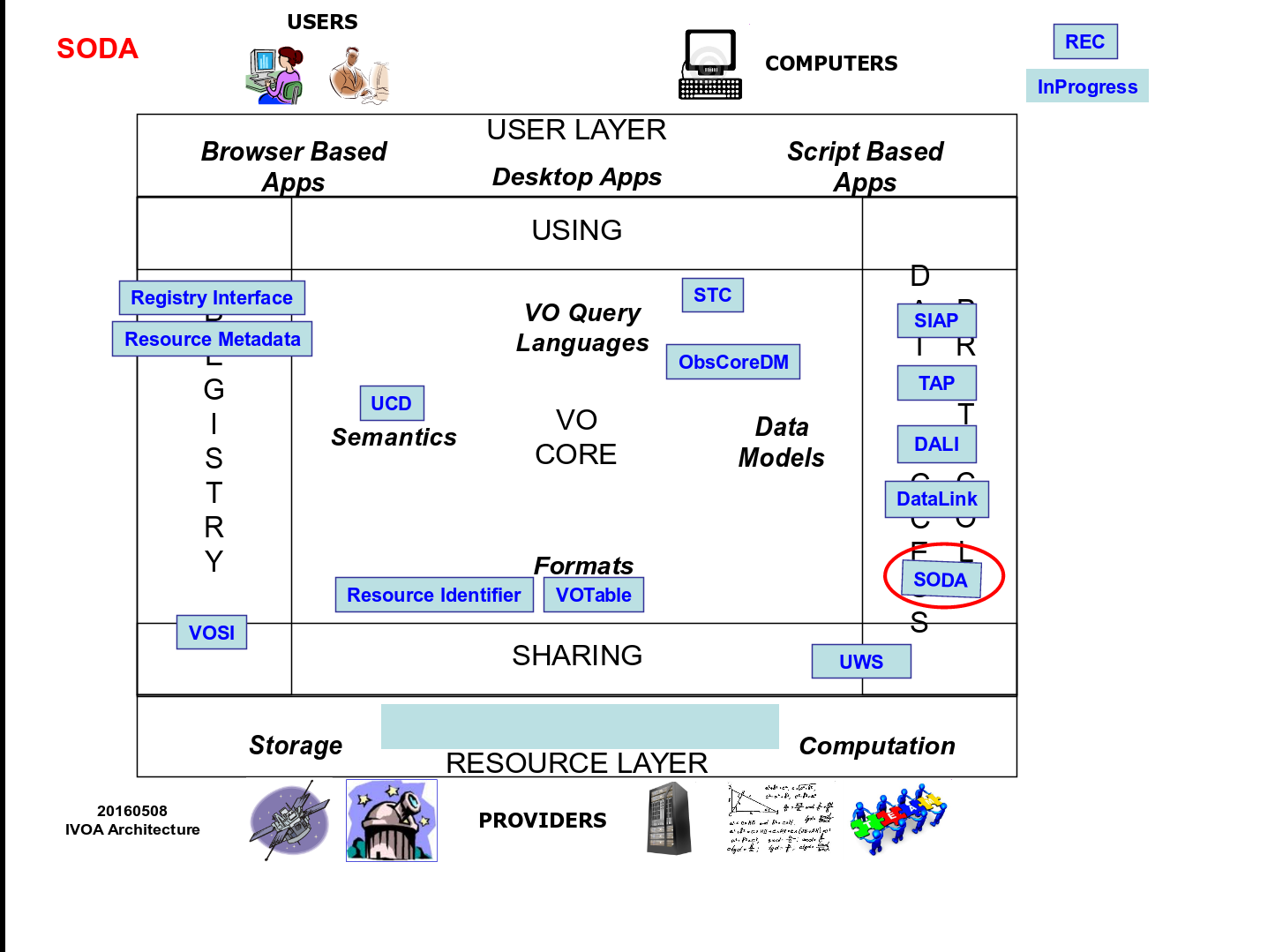
Figure SODA:fig:architecture shows how SODA fits into the IVOA architecture. SODA services conform to the Data Access Layer Interface (DALI, Dowler et al. [DALI1.0]) specification, including the Virtual Observatory Support Interfaces (VOSI, Graham et al. [VOSI1.0]) resources.
Within the IVOA architecture, SODA services could be found and used in several ways. First, a SODA service could be found in the IVOA Registry and used directly. A description of a SODA service may be found along with specific dataset metadata at either the data discovery phase using Simple Image Access (SIA, SIA) or Table Access Protocol (TAP, Dowler et al. [TAP1.0]) and the ObsCore data model [ObsCore1.0] or via a DataLink [DataLink1.0] service. The service descriptors and three-factor semantics rely on UCDs [UCDlist1.1] and the VO Unit specification [VOUnits1.0]. Since the discovery of SODA services makes use of DataLink service descriptor(s) to provide parameter metadata, the VOSI-capabilities specified in Section 2.5 Capabilities: VOSI-capabilities do not make use of a registry extension.
1.1.1 SODA Service in the Registry#
Resources in the IVOA Registry may include SODA capabilities. In order to use such services, clients require prior knowledge of suitable identifiers that are usable with a registered SODA service. This scenario is described in more detail below in Section 4.3 Finding a SODA Service in the Registry.
1.1.2 SODA Service from Data Discovery#
In the simplest case, the identifiers found via data discovery can be used directly with an associated SODA service. The query response (from SIA or TAP) would include one or more service descriptor(s) that describe the available SODA capabilities. This scenario is described in detail in Section 4.1 SODA Service Descriptor from Data Discovery.
1.1.3 SODA Service from DataLink#
In the general case, data discovery responses may direct clients to an associated DataLink service where access details can be obtained. The DataLink output will in turn provide service descriptor(s) of the associated SODA service(s). Service providers may choose this approach for several reasons; for example, one entry from data discovery may lead to multiple files or resources, or access via services such as SODA may be considered the primary access mode and direct download is not available or discouraged. This scenario is described in detail in Section 4.2 SODA Service Descriptor from DataLink.
1.2 Motivating Use Cases#
Below are some of the more common use cases that have motivated the development of the SODA specification. While this is not complete, it helps to understand the problem area covered by this specification.
Retrieve Subsection of a Datacube
Cutout a subsection using coordinate axis values. The input to the cutout operation will include one or more of the following:
a region on the sky
an energy value or range
a time value or range
one or more polarization states
The region on the sky should be something simple: a circle, a range of coordinate values, or a polygon.
Retrieve subsection of a 2D Image
This is a special case of retrieving a subsection of a datacube, where the cutout is only in the spatial axes.
Retrieve subsection of a Spectrum
This is a special case of retrieving a subsection of a datacube, where the cutout is only in the spectral axis.
Anticipated Future Use Cases. These use cases were taken into account in the general design but remain to be developed and supported in later versions of SODA.
Provide the data in different formats
Examples are images in PNG, or JPEG instead of FITS and spectra in csv, FITS or VOTable.
Flatten a Datacube into a 2D Image
Reduce a Datacube into a 1D Spectrum
Rebin Data by a Fixed Factor
Reproject Data onto a Specified Grid
Compute Aggregate Functions over the Data
Apply Standard Function to Data Values
It could be “denoising” with standard methods or “on the fly” recalibration.
Apply Arbitrary User-Specified Function to Data Values
Run Arbitrary User-Supplied Code on the Data
2 Resources#
SODA services are implemented as HTTP REST [richardson07] web services with a {sync} resource that conforms to the DALI- sync resource description.
A stand-alone SODA service may have one or both of the {sync} and {async} resources. For either type, it could have multiple resources (e.g. to support alternate authentication schemes). The SODA service may also include other custom or supporting resources.
Either the {sync} or {async} SODA capability may be included as part of other web services. For example, a single web service could contain the SIA-2.0 {query} capability, the DataLink-1.0 {links} capability, and the SODA {sync} capability. Such a service must also have the VOSI-availability and VOSI-capabilities resources to report on and describe all the implemented capabilities.
2.1 {sync} resource#
The {sync} resource is a synchronous web service resource that conforms to the DALI-sync description. Implementors are free to name this resource however they like, except that the name must consist of one URI segment only (i.e., contain no slash). This is to allow clients, given the access URL, to reliably find out the URL of the capabilities endpoint. Clients, in turn, can find the resource path using the VOSI-capabilities resource, but will in general be provided the access URLs through a previous data discovery query or through direct user input.
The {sync} resource performs the data access as specified by the input parameters and returns the data directly in the output stream. Synchronous data access is suitable when the operations can be quickly performed and the data stream can be setup and written to (by the service) in a short period of time (e.g. before any timeouts).
2.2 {async} resource#
The {async} resource is an asynchronous web service resource that conforms to the DALI-async description. The considerations on naming the resource given in sect. 2.1 {sync} resource apply here as well.
The {async} resource performs the data access as specified by the input parameters and either (i) stores the results for later transfer or (ii) pushes the results to a specified destination (e.g. to a VOSpace location). Asynchronous data access usually introduces resource constraints on the service (which may be limited) and usually imposes a higher latency before any results can be seen because the location of results does not have to be valid until the data access job is complete. Asynchronous data access is intended for (but not limited to) use when the operations take considerable time and results must be staged (e.g. some multi-pass algorithms or operations that result in multiple outputs).
2.3 Examples: DALI-examples#
SODA services should provide a DALI-examples resource with one example invocation that shows the variety of operations the service can perform. Example operations using the {sync} resource and that output a small data stream are preferred, as the examples may be used by automatic validators doing relatively frequent (of order daily) queries.
Parameters to be passed to the service must be given using the DALI generic-parameter term.
2.4 Availability: VOSI-availability#
A SODA web service must have a VOSI-availability resource as described in DALI.
2.5 Capabilities: VOSI-capabilities#
A web service that includes SODA capabilities must have a VOSI-capabilities resource as described in DALI. The standardID for the {sync} resource is
The standardID for the {async} resource is
All DAL services must implement the /capabilities resource. The following capabilities document shows the minimal metadata for a stand-alone SODA service and does not require a registry extension schema:
<?xml version="1.0"?>
<capabilities
    xmlns:vosi="http://www.ivoa.net/xml/VOSICapabilities/v1.0"
    xmlns:xsi="http://www.w3.org/2001/XMLSchema-instance"
    xmlns:vod="http://www.ivoa.net/xml/VODataService/v1.1">

  <capability standardID="ivo://ivoa.net/std/VOSI#capabilities">
    <interface xsi:type="vod:ParamHTTP" version="1.0">
      <accessURL use="full">http://example.com/data/capabilities</accessURL>
    </interface>
  </capability>

  <capability standardID="ivo://ivoa.net/std/VOSI#availability">
    <interface xsi:type="vod:ParamHTTP" version="1.0">
      <accessURL use="full">
         http://example.com/data/availability
      </accessURL>
    </interface>
  </capability>

  <capability standardid="ivo://ivoa.net/std/SODA#sync-1.0">
    <interface xsi:type="vod:ParamHTTP" role="std" version="1.0">
      <accessURL use="full">
        http://example.com/data/sync
      </accessURL>
    </interface>
  </capability>

  <capability standardid="ivo://ivoa.net/std/SODA#async-1.0">
    <interface xsi:type="vod:ParamHTTP" role="std" version="1.0">
      <accessURL use="full">
        http://example.com/data/async
      </accessURL>
    </interface>
  </capability>
</capabilities>
Note that the {sync} and {async} resources do not have to be named as shown in the accessURL(s) above. Multiple interface elements within the {sync} and the {async} capabilities may be included; this is typically used if they differ in protocol (http vs. https) and/or authentication requirements.
3 Parameters for SODA {sync} and {async}#
The {sync} and {async} resources accept the same set of parameters.
3.1 Parameter multiplicity#
Common methods of passing parameters to HTTP services allow passing the same parameter multiple times. In the following, we call a parameter that is specified multiple times in either way as having multiple values.
POL is a special case for multiplicity (see below) For all other parameters, support for multiple values of parameters is optional. If a request includes multiple values for a parameter and the service does not support multiple values for that parameter, the request must fail with the MultiValuedParamNotSupported error listed below (5.2 Errors). For example, a service may allow only single values for ID but multiple values for cutout parameters. Supported multiplicity may also differ between sync and async requests.
In general, services would support multi-valued parameters as they may be able to provide more efficient access to data files. Clients may attempt to use multi-valued parameters, but must be prepared to fall back to multiple requests if the service indicates this is not supported. A future version of DataLink should provide a mechanism to describe parameter multiplicity.
3.2 Common Parameters#
3.2.1 ID#
The ID parameter is used to specify the dataset or file to be accessed. The values for the ID parameter are generally discovered from data discovery requests. The values must be treated as opaque identifiers that are used as-is. The DataLink specification describes mechanisms for conveying opaque parameters and values in service descriptor resources that can be used by clients to set the ID parameter.
The UCD describing the ID parameter is .SODA
3.3 Filtering Parameters#
Filtering parameters are used to extract subsets of large datasets or data files. The extraction uses a best possible match to the requested subset. In case the parameter values excede the size of the archived dataset the service operates a reduction of these values to the archived dataset size.
3.3.1 MOC#
The MOC parameter defines a subset of space using the moc defined in DALI. The parameter syntax is defined as in the MOC specification []
Examples :
Extracting cells 1 and 2 at order 1 will read this way MOC = 1/1 2
Extracting cells 1 at order 1 and cells 1 to 6 at order 2 will read MOC = 1/1 2/1-6
At the time of writing there is no possibility to extend this ascii syntax to TMOC or STMOC
3.3.2 POS#
The POS parameter defines the positional region(s) to be extracted from the data. The value is made up of a shape keyword followed by coordinate values. The allowed shapes are given in Table SODA:tab:shapetypes.
As in DALI intervals, open ranges use -Inf or +Inf as one limit.
Examples for POS values:
A circle at (12,34) with radius 0.5:
POS=CIRCLE 12 34 0.5
A range of [12,14] in longitude and [34,36] in latitude:
POS=RANGE 12 14 34 36
A polygon from (12,34) to (14,34) to (14,36) to (12,36) and (implicitly) back to (12,34):
POS=POLYGON 12 34 14 34 14 36 12 36
A band around the equator:
POS=RANGE 0 360 -2 2
The north pole:
POS=RANGE 0 360 89 90
All longitude and latitude values (plus the radius of the CIRCLE) are expressed in degrees in ICRS. [1]
The UCD describing the POS parameter is .
Since it is string-valued, POS is unitless; however, the numeric values contained in the string are all in decimal degrees. In VOTable, the POS parameter has datatype="char" and arraysize="*".
POS is included in SODA for consistency with the SIA-2.0 query parameter of the same name. Note that use of the POS parameter with shape keyword “CIRCLE” provides the equivalent spatial region as the CIRCLE parameter and POS with the shape keyword “POLYGON” is equivalent to the POLYGON parameter. There is no type-specific parameter that is equivalent to the “RANGE” shape keyword. There is no way for a service provider to declare support for a subset of the POS shape keywords in a DataLink service descriptor; either POS is included or not and if included then all keywords must be supported.
3.3.3 CIRCLE#
The CIRCLE parameter defines a spatial region using the circle xtype defined in DALI.
Example: a circle at (12,34) with radius 0.5:
CIRCLE=12 34 0.5
The UCD describing the CIRCLE parameter is .
CIRCLE is equivalent in functionality to POS=CIRCLE .... Data type and unit metadata are unambiguously defined.
3.3.4 POLYGON#
The POLYGON parameter defines a spatial region using the polygon xtype defined in DALI.
Example: a polygon from (12,34) to (14,34) to (14,36) to (12,36) and (implicitly) back to (12,34):
POLYGON=12 34 14 34 14 36 12 36
The UCD describing the POLYGON parameter is .
POLYGON is equivalent in functionality to POS=POLYGON .... Data type and unit metadata are unambiguously defined.
3.3.5 BAND#
The BAND parameter defines the wavelength interval(s) to be extracted from the data using a floating point interval (xtype="interval") as defined in DALI. The value is an open or closed numeric interval with numeric values interpreted as wavelength(s) in metres. As in DALI, open intervals use -Inf or +Inf as one limit.
The closed interval [500,550]:
BAND=500 550
The open interval (-inf,300]:
BAND=-Inf 300
The open interval [750,inf):
BAND=750 +Inf
The scalar value 550, equivalent to [550,550]:
BAND=550 550
Extracting using a scalar value should normally extract a single pixel along the energy axis of the data; extracting using an interval should extract one or more pixels.
All energy values are expressed as barycentric wavelength in meters. [2]
The UCD describing the BAND parameter is .
3.3.6 TIME#
The BAND parameter defines the time interval(s) to be extracted from the data using a floating point interval (xtype="interval") as defined in DALI. The value is an open or closed interval with numeric values interpreted as Modified Julian Date(s) in UTC. As in DALI, open intervals use -Inf or +Inf as one limit.
An open interval from the MJD 55100.0 and all later times:
TIME= 55100.0 +Inf
A range of MJD values:
TIME=55123.456 55123.466
An instant in time using Modified Julian Date:
TIME=55678.123456 55678.123456
The UCD describing the TIME parameter is .
3.3.7 POL#
The POL parameter defines the polarization state(s) (Stokes) to be extracted from the data.
Extract the unpolarized intensity:
POL=I
Extract the standard circular polarization:
POL=V
Extract only the IQU components:
POL=I
POL=Q
POL=U
As shown in the example above, the POL parameter must support multiple values for both {sync} and {async} requests. Unlike general filtering parameters, all values of POL are combined into a single filter; for example, if the request includes the three values above, the job would generate one result with some or all of these polarization states (per combination of ID and other filtering parameters).
The UCD describing the POL parameter is .
3.4 Filtering parameters and ObsCore data model#
Filtering parameters drive the generation of virtual datasets. The ObsCore model is perfectly valid to describe virtual data that SODA is able to generate. Hence all SODA filtering parameters are coupled with some Obscore model concepts.
The spatial parameters (CIRCLE, POLYGON and POS) constrain the spatial support of the output virtual dataset.
The TIME parameter constrains the time bounds of the SODA output virtual dataset.
The BAND parameter constrains the spectral bounds of the SODA output virtual dataset.
Support and bounds of the output datasets for each parameter are included in support and bounds of the archived dataset.
The POL parameter constrain the list of polarization states in the output virtual dataset. The valid values for this param are included in the list given by the value of the pol_states attribute of the archived dataset.
3.5 Three-Factor Semantics#
Parameters in SODA are uniquely defined by the triple of name, UCD, and unit. Data services are free to support as many such parameters as is appropriate for their datasets, in addition to supporting standard parameters. With the three factors, it is unlikely that two service providers will by accident use the same three factors for parameters of differing semantics.
To identify parameters, clients must use the three factors name, UCD, and unit. This is true for both the standard parameters defined here and custom parameters introduced by services. For instance, a BAND parameter that is missing the em.wl;stat.interval UCD or has a unit that is not meter must not be treated as the SODA BAND parameter. With standard parameters as defined in this document, clients can rely on certain semantics and exploit that knowledge in the provision of special UIs or APIs. Standard parameters defined so far are given in table SODA:table:standardpars. For the time being, instructions for how to propose additional parameters will be given on the landing page of the IVOA DAL working group [3]
Table SODA:table:freepars is an exemple of definition of additional custom non-standard parameters.
Both standard and non-standard parameters should follow DALI conventions if at all possible. Roughly, float-valued target fields should be accessed or constrained via interval-valued parameters (i.e., do not split up minimum and maximum into separate parameters). Depending on their semantics, integer parameters should either be intervals or enumerated parameters (which typically can be repeated in the manner of POL). Geometry fields should be accessed or constrained using geometry values (circle and polygon xtypes from DALI), following the examples of CIRCLE (3.3.3 CIRCLE) and POLYGON (3.3.4 POLYGON).
Parameter metadata, including three-factor semantics, is conveyed to clients via DataLink service descriptor(s) as described in Section 4 Integration of Service Capabilities.
4 Integration of Service Capabilities#
Finding and using SODA services depends on several other standards; service providers can follow one or more strategies in integrating a range of standard and custom services with their SODA implementation. Here we describe these strategies and show how to use the standards together.
Within the IVOA architecture, SODA services could be found and used in two ways. First, a SODA service could be found in the IVOA Registry and used directly. Second, a description of a SODA service may be found along with specific dataset metadata; this is the primary anticipated usage: clients discover applicable SODA services while doing data discovery queries.
The DataLink recommendation provides a mechanism to include “a description of a SODA service” using a standard resource called a service descriptor. The service descriptor can be included in any VOTable [VOTable1.3] output and can describe the parameters for use with a DALI-sync or DALI-async compliant capability which may be a standard service or a custom service. Since the service descriptor can describe all input parameters, it can declare available standard parameters, extensions (custom parameters in standard services), and parameters for custom services. This mechanism is expected to be the primary means for finding and using a SODA service.
A generic SODA sync service descriptor describing the standard parameters (see sect. 3 Parameters for SODA {sync} and {async}):
<RESOURCE type="meta" ID="soda-sync" utype="adhoc:service">
  <PARAM name="standardID" datatype="char" arraysize="*"
         value="ivo://ivoa.net/std/SODA#sync-1.0" >
   <DESCRIPTION>service protocol standard id</DESCRIPTION>
  </PARAM>
  <PARAM name="accessURL" datatype="char" arraysize="*"
        value="http://example.com/soda/sync" >
  <DESCRIPTION>access url of the service</DESCRIPTION>
  </PARAM>
  <GROUP name="inputParams">
    <PARAM name="ID" ucd="meta.ref.url;meta.curation"
            ref="idcolumn-ref"
            datatype="char" arraysize="*" value="" >
    <DESCRIPTION>The publisher DID of the dataset of interest</DESCRIPTION>
    </PARAM>
    <PARAM name="POS" ucd="pos.outline;obs"
            datatype="char" arraysize="*" value="" >
     <DESCRIPTION>Region to  cut out, as Circle, Box, or Polygon</DESCRIPTION>
    </PARAM>
    <PARAM name="CIRCLE" unit="deg" ucd="pos.outline;obs"
            datatype="double" arraysize="3"
            xtype="circle" value="" >
    <DESCRIPTION>A circle that should be covered by the cutout.</DESCRIPTION>
    </PARAM>
    <PARAM name="POLYGON"  unit="deg" ucd="pos.outline;obs"
            datatype="double" arraysize="*"
            xtype="polygon"  value="" >
    <DESCRIPTION>A polygon  that should be covered by the cutout.</DESCRIPTION>
    </PARAM>
    <PARAM name="BAND" unit="m" ucd="em.wl;stat.interval"
            datatype="double" arraysize="2"
            xtype="interval" value="" >
    <DESCRIPTION>The wavelength intervals to be extracted</DESCRIPTION>
    </PARAM>
    <PARAM name="TIME" ucd="time.interval;obs.exposure" unit="d"
            datatype="double" arraysize="2"
            xtype="interval" value="" >
     <DESCRIPTION>TIME Interval to be extracted in MJD</DESCRIPTION>
    </PARAM>
    <PARAM name="POL" ucd="meta.code;phys.polarization"
            datatype="char" arraysize="*" value="" >
     <DESCRIPTION> Polarization states list to be extracted</DESCRIPTION>
    </PARAM>
  </GROUP>
</RESOURCE>
This service descriptor is generic because the ID parameter uses a attribute to specify that identifier values come from elsewhere in the document (usually this refers to a FIELD element that describes a table column within another RESOURCE element). Thus, this descriptor can be used with any ID values in that column.
The PARAM with name="standardID" specifies that this service is a SODA sync service. The standardID values for SODA are specified in Section 2.5 Capabilities: VOSI-capabilities.
The GROUP with name="inputParams" shows the standard description of the standard SODA parameters as defined in Section 3 Parameters for SODA {sync} and {async}. Services should only include parameter descriptions for supported parameters; in a generic service descriptor “supported” means supported by the implementation and does not imply that use of that parameter is applicable to all data (e.g. to all possible identifier values).
All PARAMs in the descriptor may include a subelement. This element is providing domain limits or list of admitted values. See section 4.2 SODA Service Descriptor from DataLink for a full description of the usage of this feature.
4.1 SODA Service Descriptor from Data Discovery#
In the simplest case, the identifiers found via data discovery (e.g. the obs_publisher_did in ObsCore) can be used directly with an associated SODA service. Then the query response from SIAv2 or TAP should include one or more DataLink service descriptors that describe the SODA capabilities. These would have a standardID parameter specifying SODA {async} or SODA {sync} as specified in Section 2.5 Capabilities: VOSI-capabilities and an appropriate accessURL parameter for the service. If the service is registered, the provider can include a resourceIdentifier parameter which will contain the registered identifier of the service.
The supported SODA service parameters (standard and custom) would be declared in the inputParams group of the service descriptor.
The declaration of the ID parameter will specify which column in the data discovery response contains the suitable identifier; although this is usually the obs_publisher_did from the ObsCore data model, this is not required and the provider may have the ID parameter reference another (possibly custom) column.
The data discovery response will in general contain metadata the client can use to determine the values of SODA filtering parameters that will yield valid subsets of the data. For example, standard data discovery using either SIAv2 or TAP and ObsCore will provide metadata for specifying POS, CIRCLE, and POLYGON (s_region, s_ra, s_dec, s_fov), BAND (em_min, em_max), TIME (t_min, t_max), and POL (pol_states) parameters.
When a service descriptor for a SODA service is provided in the data discovery response, it should be a generic descriptor (see above) for use with multiple ID values. Thus, there will normally be a single service descriptor for each available service.
4.2 SODA Service Descriptor from DataLink#
The alternative scenario has the discovery service return Datalink documents (see DataLink for the two ways to do that: via the access_url or via a DataLink “service descriptor” in the query response). These Datalink documents can then contain one or more SODA descriptor(s), most typically one per dataset described. To allow SODA clients the inference of parameter ranges and the presentation of useful user interfaces, data providers SHOULD communicate the admissable ranges of the parameters in question using the VOTable element.
For float-valued intervals (e.g., the standard BAND and TIME parameters), and should be used to communicate the range of values for which clients can expect to receive data. Example:
<PARAM name="BAND" unit="m" ucd="em.wl;stat.interval"
    datatype="double" arraysize="2"
    xtype="interval" value="">
    <DESCRIPTION>The wavelength intervals to be extracted</DESCRIPTION>
    <VALUES>
      <MIN value="3e-7"/>
      <MAX value="8e-7"/>
    </VALUE>
  </PARAM>
Enumerated values, both for integral and textual types, use / elements unless there are too many possible values. Again, only values for which nonempty responses can be expected for the described dataset should be listed. Example:
<PARAM name="POL" ucd="meta.code;phys.polarization"
    datatype="char" arraysize="*" value="">
    <DESCRIPTION>Polarization states to be extracted.</DESCRIPTION>
    <VALUES>
      <OPTION>I</OPTION>
      <OPTION>V</OPTION>
    </VALUE>
  </PARAM>
In case the option enumeration becomes too large, the description of the parameter should carefully describe what values are admissable, e.g., by providing a link to an enumeration in the .
Intervals of integers are described analogous to float-valued intervals, i.e., using and elements.
Standard VOTable semantics are insufficient for the metadata of the SODA POLYGON and CIRCLE parameters. We therefore define special cases for the :raw-latex:`xmlel{xtype}`s circle and polygon at least until such time when a proper data model for space-time coordinates will define a different way to communicate such coverages within VOTables.
For CIRCLE, only a is given. It contains three floating point values, separated by whitespace. These correspond to the RA and Dec of the center of a spherical circle covering the dataset, and a radius of such a covering circle. Data providers SHOULD make sure they choose the center and radius such that the covering circle is close to the minimal one of the dataset. Example:
<PARAM name="CIRCLE" unit="deg" ucd="pos.outline;obs"
    datatype="double" arraysize="3"
    xtype="circle" value="">
    <DESCRIPTION>
      A spherical circle to be contained by the cutout
    </DESCRIPTION>
    <VALUES> <MAX value="12.0 34.0 0.5"/> </VALUES>
  </PARAM>
For POLYGON, again only a is given. It consists of a sequence of floating-point values, again separated by blanks, describing RA and Dec of the vertices of a spherical polygon covering the dataset. Data providers are encouraged to choose a minimal polygon. Example:
<PARAM name="POLYGON"  unit="deg" ucd="pos.outline;obs"
        datatype="double" arraysize="*"
        xtype="polygon"  value="">
  <DESCRIPTION>A polygon to be contained by the cutout</DESCRIPTION>
  <VALUES>
    <MAX value="11.5 33.5 12.5 33.5 12.5 34.5 11.5 34.5"/>
  </VALUES>
</PARAM>
Angles in both CIRCLE and POLYGON are in degrees. As in the input, the ICRS reference system is assumed, with no further metadata (e.g., reference position) prescribed by this standard. Further metadata should be given using standard STC annotation when the formalism to do that is finalised.
For POS, useful metadata cannot be given. Services supporting POS should therefore provide POLYGON as well, and clients wishing to use POS should infer sensible values for that parameter from given for POLYGON.
A full example for a dataset-specific datalink descriptor is given in appendix A Full SODA Descriptor example.
Providing values in the parameter descriptions of a data-specific service descriptor implies that the resource generating this has access to the applicable metadata. Depending on system architecture, this may be difficult to implement. [4]
4.3 Finding a SODA Service in the Registry#
Resources in the IVOA Registry may include SODA capabilities. However, in order to use such services, clients require prior knowledge of suitable identifiers that are usable with a registered SODA service. As a result, finding and using a SODA service via the registry is not expected to be a common usage pattern.
5 {sync} Responses#
All responses from the {sync} resource follow the rules for DALI-sync resources, except that the {sync} response allows for error messages for individual input identifier values.
5.1 Successful Requests#
Successfully executed requests should result in a response with HTTP status code 200 (OK) and a response in the format requested by the client or in the default format for the service.
If the values specified for cutout parameters do not include any pixels from the target dataset/file, the service must respond with HTTP status code 204 (No Content) and no response body, as stated in DALI.
The service should set the following HTTP headers to the correct values where possible.
Since the response is usually dynamically generated, the Content-Length and Last-Modified headers cannot usually be set.
5.2 Errors#
The error handling specified for DALI-sync resources applies to service failure. Error codes are specified in DALI. Error documents should be text using the text/plain content-type and the text must begin with one of the following strings:
6 {async} Responses#
The {async} resource conforms to the DALI-async resource description, which means the job is a UWS job with all the job control features available. All result files are to be listed as children of the UWS results resource. The service provider is free to name each result.
When multiple values of input parameters are accepted, each combination of values produces one result. For example, if an {async} job included two CIRCLE and two BAND values, there must be four results. If a combination of input parameters does not produce a result (e.g. there is no overlap between the parameter values and data extent), the job results must contain a result entry that indicates this. This should be a result URL which returns a text/plain document with a message starting with one of the error labels in Section 5.2 Errors above.
Appendices#
A Full SODA Descriptor example#
Below is an example illustrating how a SODA descriptor for a dataset as delivered in a DataLink document might look like (see sect 4.2 SODA Service Descriptor from DataLink). Note in particular how is used in the declaration of the ID parameter to convey the fixed value corresponding to the dataset described.
The particular dataset described here is a spectral cube. Therefore no TIME and POL parameters are defined.
The example also illustrates how a custom parameter (here, KIND) would be declared.
<RESOURCE ID="referenced" type="meta" utype="adhoc:service">
    <GROUP name="inputParams">
      <PARAM arraysize="*" datatype="char" name="ID" ucd="meta.id;meta.main"
        value="ivo://org.gavo.dc/~?califa/datadr3/COMB/NGC0180.COMB.rscube.fits">
        <DESCRIPTION>The publisher DID of the dataset of interest</DESCRIPTION>
      </PARAM>
      <PARAM arraysize="*" datatype="char" name="POS" ucd="pos.outline;obs"
        value="">
        <DESCRIPTION>Region to (approximately) cut out, as Circle, Box,
          or Polygon</DESCRIPTION>
      </PARAM>
      <PARAM arraysize="*" datatype="double" name="POLYGON"
        ucd="pos.outline;obs" unit="deg" value="">
        <DESCRIPTION>A polygon (as a flattened array of ra, dec pairs) that
          should be covered by the cutout.</DESCRIPTION>
        <VALUES>
          <MAX value="9.499 8.626 9.499 8.645 9.478 8.645 9.478 8.626"/>
        </VALUES>
      </PARAM>
      <PARAM arraysize="3" datatype="double" name="CIRCLE"
        ucd="pos.outline;obs" unit="deg" value="">
        <DESCRIPTION>A circle (as a flattened array of ra, dec, radius)
          that should be covered by the cutout.</DESCRIPTION>
        <VALUES>
          <MAX value="9.4889955890 8.6358711588 0.0146493214"/>
        </VALUES>
      </PARAM>
      <PARAM arraysize="2" datatype="double" name="BAND" ucd="em.wl;stat.interval"
        unit="m" value="" xtype="interval">
        <DESCRIPTION>Vacuum wavelength limits</DESCRIPTION>
        <VALUES>
          <MIN value="3.701e-07"/>
          <MAX value="7.501e-07"/>
        </VALUES>
      </PARAM>
      <PARAM arraysize="*" datatype="char" name="KIND" ucd="" value="">
        <DESCRIPTION>Set to HEADER to retrieve just the primary header,
          leave empty for data.</DESCRIPTION>
        <VALUES>
          <OPTION name="Retrieve header only" value="HEADER"/>
          <OPTION name="Retrieve the full data, including header (default)"
            value="DATA"/>
        </VALUES>
      </PARAM>
    </GROUP>
    <PARAM arraysize="*" datatype="char" name="accessURL" ucd="meta.ref.url"
      value="http://dc.g-vo.org/califa/q3/dl/dlget"/>
    <PARAM arraysize="*" datatype="char" name="standardID"
      value="ivo://ivoa.net/std/SODA#sync-1.0"/>
  </RESOURCE>
B Changes from Previous Versions#
B.1 Changes from PR-SODA-20160429#
Make multiple values for all parameters optional in both sync and async requests and introduce a specific error message if multiplicity of a parameter is not supported.
Added section introducing the different usage scenarios for SODA and how they can interact with other DAL capabilities. Moved the bulk of the normative text to an integration section so that it follows the primary specification of SODA resources and parameters.
Re-organised so that UCDs for parameters are only specified once in the section on three-factor semantics.
Added CIRCLE AND POLYGON “double array” parameters. POS is retained for consistency with SIA-2.0 query.
Interval xtype as strict arraysize=2 array consistently with DALI 1.1
SODA autodescription is postponed to version 1.1.
VALUES for xtype=interval now use MIN and MAX rather than MAX alone.
B.2 Changes from WD-SODA-1.0-20151212#
POS is now unitless
Aligned parameter UCDs with what is in ObsCore
Removed gratuitous xtypes.
B.3 Changes from WD-SODA-1.0-20151120#
Change the name of the protocol. Suppression of SELECT and COORD. xtype description are in DALI. Reference to this has been added.
B.4 Changes from WD-AccessData-1.0-20151021#
Added general introduction on PARAMETER description to section 3. Modified SELECT and COORD sections in order to detach them from SimDal. Added Appendix on xtype description with BNF syntax.
B.5 Changes from WD-AccessData-1.0-20140730#
Removed REQUEST parameter since the DAL-WG decision to not include it when there is only one value.
Clarified that ID and filtering parameters are single valued for {sync} and multi-valued for {async}, with POL being multi-valued but still being treated as a single filter.
B.6 Changes from WD-AccessData-1.0-20140312#
This is the initial document version.